


The LMS That Integrates With Employment Hero: Two-Way Sync, Auto-Enrolment and Certifications That Write Themselves
SuperPath is the LMS that integrates with Employment Hero: people sync in, and completed pathways, learning and certificates with expiry dates write back to the employee record. Everything included at AUD $5 per user per month.

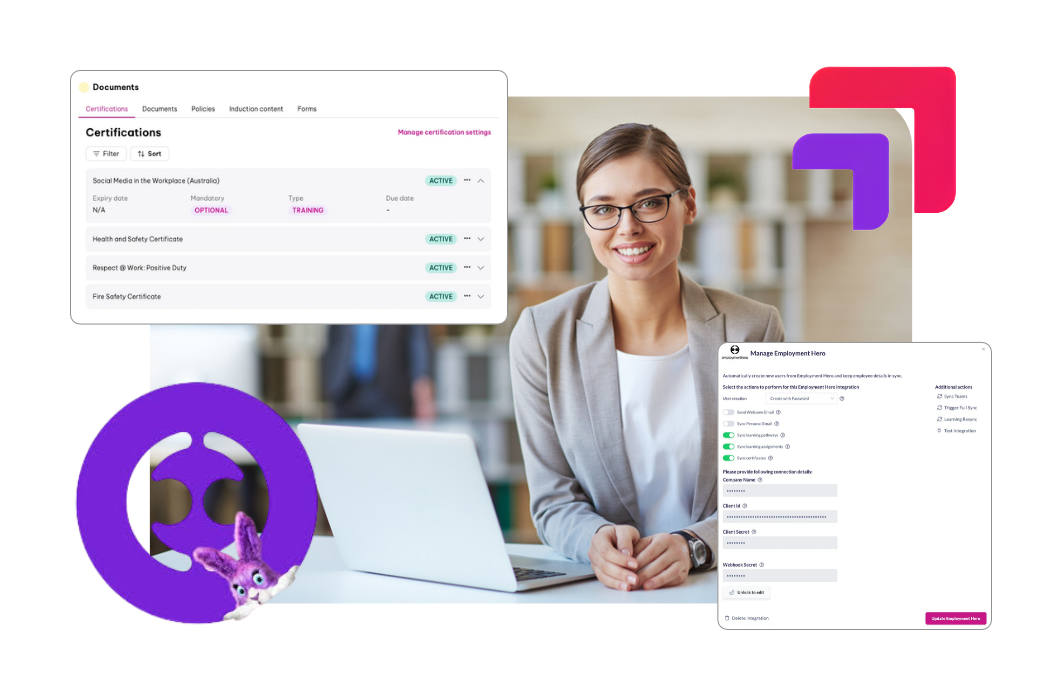
TL;DR: SuperPath is an Australian LMS that integrates with Employment Hero through a two-way sync. People, job titles, teams and managers flow in from Employment Hero, and new starters get a SuperPath account automatically. Completed pathways, learning and certificates with expiry dates are written back to the employee's Employment Hero record. Everything is included at AUD $5 per user per month.
Key takeaways
- Since September 2026 the SuperPath Employment Hero integration is two-way: people data flows in, and passed training flows back into the employee's Certifications in Employment Hero.
- Three separate write-back settings control what lands in Employment Hero: completed pathways and completed learning (as Training records) and earned certificates with expiry dates (as Qualifications).
- Employment Hero's own learning offer is content-led and powered by Go1. Its published add-ons are a 10-course bundle at $8 per employee per month and LMS Plus at $17, on top of the HR plan.
- At published list prices, a 500-person business pays $102,000 a year for LMS Plus. SuperPath's all-inclusive price for the same headcount is $30,000, with authoring, an Australian course library and the integration included.
- Employment Hero stays the source of truth for people data. SuperPath never owns employee records; it owns the learning and sends the result back.
Why do Employment Hero customers need a dedicated LMS?
Employment Hero customers need a dedicated LMS when training has to be assigned, evidenced and renewed, not just made available. Employment Hero's learning offer is built around a content library. A learning management system is built around who must complete what, by when, and whether it is still current. Those are different jobs.
Employment Hero is one of the biggest technology companies Australia has produced. According to Employment Hero, more than 350,000 businesses and two million employees use its platform, and it passed AUD $250 million in annualised recurring revenue in February 2025. For many Australian mid-market businesses it is the place where people data lives: onboarding, contracts, payroll, rosters, policies.
So it is natural to look to the same platform for training. Read Employment Hero's own learning product page closely, though, and notice what it promises. The headline is "a curated library of the best learning content", powered by Go1. The supporting copy is about content from over 250 global providers and "an extensive library of 80,000+ courses including videos, articles, and interactive quizzes". It is a strong content story. What it barely discusses is learning management: authoring your own courses, expiry and recertification, structured pathways, or the audit evidence an Australian compliance program runs on.
I know this product from the inside. I spent seven years on Go1's founding team and helped establish the Go1 and Employment Hero partnership in the early days, when Employment Hero branded its learning product Hero Learn. It was a genuinely good idea, and Go1 remains an excellent content business. But a library answers "what can my people learn?" The questions that keep an HR manager awake are different: who has not done their WHS induction, whose first aid certificate expires next month, and can I prove it if a regulator asks?
The legal standard makes the distinction matter. Under the model Work Health and Safety Regulations, regulation 39 requires training to be "suitable and adequate" for the work and its risks. The model Code of Practice How to Manage Work Health and Safety Risks is blunter: "It is insufficient to simply give a worker the procedure and ask them to acknowledge that they understand and are able to perform it." A policy acknowledged in an HR system, or a course somebody could have opened, is not the same as training that was assigned, completed, assessed and recorded.
What is the SuperPath Employment Hero integration and how does it work?
The SuperPath Employment Hero integration is a two-way connection between Employment Hero, the HR and payroll platform, and SuperPath, an all-inclusive Australian LMS. Employment Hero remains the source of truth for people. SuperPath delivers, assesses and certifies the training, then writes the result back into the employee's Employment Hero record.
The loop runs in four steps:
- A person is added or changed in Employment Hero. Their name, job title, location, team and manager sync to SuperPath.
- SuperPath creates their account and enrols them. New starters get access automatically, and pathways assign the onboarding, compliance and role-specific learning their team and role require.
- They complete and pass the learning. Workflows handle reminders, escalations and renewals so nobody has to chase.
- The result is written back. Completed pathways and learning appear as Training records, and certificates appear as Qualifications with their expiry dates, under the employee's Certifications in Employment Hero.
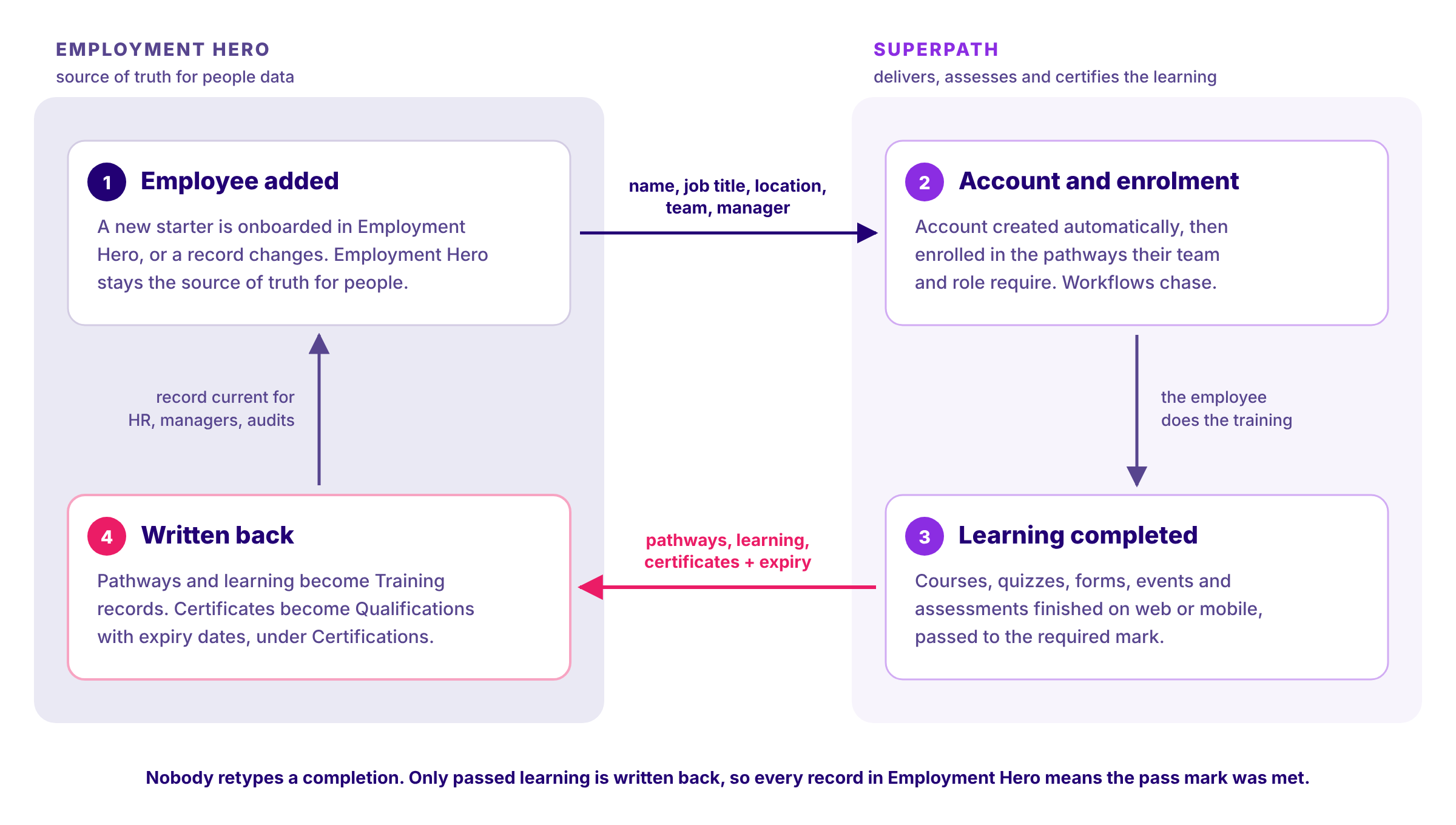
The boundary is deliberate. SuperPath does not run payroll, store contracts or own employee records, in the same way it keeps Bob as the source of truth in the SuperPath HiBob integration and Deputy as the source of truth in the SuperPath Deputy integration. Employment Hero owns the person. SuperPath owns the learning, and sends the outcome home.
What data actually syncs between Employment Hero and SuperPath?
People, job titles, locations, teams and managers sync from Employment Hero into SuperPath, and new starters get accounts automatically. Completed pathways, completed learning and certificates with expiry dates sync back to Employment Hero, each under its own setting, and only passed learning is ever written.
This is the question most integration pages skip, so here it is at the level of the actual settings, drawn from SuperPath's Employment Hero configuration guide and the integration listing on Employment Hero's marketplace.
Coming from Employment Hero, people, job titles, locations, teams and managers sync into SuperPath, so nobody types an org chart twice. Employment Hero teams become SuperPath teams, and membership updates as people move. The sync listens for four Employment Hero events: employee created, employee updated, employee onboarded and employee offboarding.
How people get their accounts is chosen when you connect, and the options matter for different workforces:
- Invite Users: an invitation goes out and the person appears once they accept. The right choice if you use Google or Microsoft single sign-on.
- Create with Magic Link: the account is created and the person signs in from an emailed link, with no password to forget. Often the difference between a rollout that reaches frontline staff and one that stalls at head office.
- Create with Password, Google, Microsoft or SAML: for organisations with an established identity setup.
- Manual: no accounts are created automatically, but people you add yourself are kept in sync.
Going back to Employment Hero, there are three independent settings, and all three are off until you turn them on:
Setting | What is written back | How it appears in Employment Hero |
|---|---|---|
Sync learning pathways | A completed pathway, as one record | Training record |
Sync learning assignments | Completed content, events, forms and pathway steps | Training record |
Sync certificates | An earned certificate, with its award and expiry date | Qualification |
Three details separate this from a basic connector:
- Each course and pathway has its own Sync with HRIS setting. You can keep an optional lunch-and-learn out of the formal record while pushing every compliance course into it.
- Only passed learning is written back. A failed attempt never appears as a certification, so a record in Employment Hero means the pass mark was met.
- Certificates earned outside SuperPath can be written back too. A first aid certificate or a licence renewal added in SuperPath lands in Employment Hero with its expiry date, so the record of what someone holds lives in one place.
When a person leaves, the offboarding event disables their SuperPath account when Employment Hero records a termination date. Compare that with the Go1 and Employment Hero integration, where Go1's own help centre notes that if an account is deactivated in Employment Hero, "the Go1 account stays active" until a Go1 administrator deactivates it manually.
When you need history, a one-click Learning Resync sends past completions to Employment Hero. It is safe to run more than once, so switching the integration on does not leave years of training sitting outside the record.
Why does writing training back to Employment Hero matter?
Writing training back to Employment Hero matters because it is where managers, HR and payroll already look. If completions live only in the LMS, someone ends up exporting, reconciling or retyping them. When the LMS writes them back automatically, the employee record is current by default and evidence stops depending on someone's memory.
Do the arithmetic for a 300-person business with five required items each. That is 1,500 records to create, and if most renew annually, 1,500 again every year. Every one that carries an expiry needs the date entered correctly, and expiry is exactly the field an auditor asks about.
Record-keeping is a real obligation, not housekeeping. According to Safe Work Australia's guidance for major hazard facilities, "keeping good records of training provided to workers and visitors is an essential element of an effective training system", capturing what was delivered, to whom, when, and by whom. Some hazards attach specific retention periods: under the model WHS Regulations, asbestos training records must be kept while the worker carries out the work and for five years after, and confined spaces records for two years. A record that writes itself on completion, carrying the right dates, is the cheapest way to meet those duties at scale.
There is also a lesson from the Fair Work Commission on what does not count. In Stutsel v Linfox Australia Pty Ltd [2011] FWA 8444, the tribunal said of an employer relying on induction and a handbook: "In the current electronic age, this is not sufficient." Policies in a folder are not training. Assigned, completed and recorded learning is.
How does SuperPath compare with Employment Hero Learning?
Employment Hero Learning is a content-led add-on built on the Go1 library. SuperPath is a full LMS with its own Australian course library, AI authoring and two-way write-back. Both run alongside Employment Hero, so the real comparison is what you get for the learning line on your invoice.
Capability | Employment Hero Learning (powered by Go1) | Tribal Habits | SuperPath |
|---|---|---|---|
What it is | Learning add-on inside the HR platform | Australian LMS with authoring and a library | Australian all-inclusive LMS |
Content approach | Go1 library; 10-course bundle or LMS Plus | 500+ editable AU and NZ modules | Included library of Australian compliance, workplace skills, AI readiness, sales, hospitality and retail courses, all editable |
Authoring your own courses | Basic course creation described in Employment Hero's help centre | Built-in authoring | AI Course Builder included |
Employment Hero sync | Native | User sync, via managed integrations (a paid add-on); write-back of completions not stated | Two-way: people in; pathways, learning and certificates with expiry back |
Certificates with expiry in Employment Hero | Not described in Employment Hero's learning documentation | Not stated | Yes, written as Qualifications |
Published pricing | $8 or $17 per employee per month, on top of the HR plan | $6.00 to $8.50 per monthly active user on Business plans, plus paid add-ons | AUD $5 per user per month, everything included |
Read fairly, that table says Employment Hero Learning is a convenient way to give a team access to off-the-shelf content without adding a vendor. If that is the whole requirement, it does the job. Tribal Habits is a credible Australian LMS with a strong library, and it integrates with Employment Hero for user sync, although managed HRIS integrations are a paid add-on on its Business plans.
The separation is in three places. First, SuperPath writes certificates back into Employment Hero with expiry dates, which is the field compliance depends on. Second, every course in SuperPath's library can be edited with the AI Course Builder to carry your policies, branding and examples, where third-party library content generally cannot be changed. Third, the price is one published number with no add-ons.
How much does an LMS for Employment Hero cost?
On Employment Hero's published Australian pricing, learning is an add-on to the HR plan: the Learning 10-Course Bundle is $8 per employee per month (minimum $80 a month) and LMS Plus is $17 per employee per month (minimum $170). SuperPath is AUD $5 per user per month with content, authoring and the integration included.
The bundle is described as a "pre-selected set of 10 industry-relevant courses covering compliance, leadership and core workplace skills". That sits a long way from the 80,000-course headline on the learning page, and it is the clearest public example of a pattern across the market: the library you see in the marketing is not always the library you license.
Here is what the learning line costs at list price, in addition to whichever Employment Hero HR plan you keep:
Headcount | Employment Hero 10-Course Bundle | Employment Hero LMS Plus | SuperPath, all inclusive |
|---|---|---|---|
100 | $9,600 a year | $20,400 a year | $6,000 a year |
200 | $19,200 a year | $40,800 a year | $12,000 a year |
500 | $48,000 a year | $102,000 a year | $30,000 a year |
These are published list prices, and either vendor may negotiate. SuperPath offers tailored pricing for larger teams and not-for-profits, and a 30-day free trial. The point is not that Employment Hero is expensive; its HR platform is excellent value, and you keep it. The point is that the learning layer is a separate decision, and the cheapest option is also the deeper one.
For a fuller view of how Australian LMS pricing models compare, see our guide to how much an LMS costs in Australia.
What happens to Go1 content if you switch?
Nothing forces you to give it up. SuperPath can connect third-party libraries, including Go1, so a team attached to particular courses can keep them. In practice most teams find they no longer need a separate content subscription, because the included library covers the core and the AI Course Builder handles everything specific to the business.
I say that from an unusual seat. At Go1 I was the top sales representative for six consecutive years. In three years at SuperPath, across more than 100 customers, I have sold zero Go1 subscriptions, even though we can integrate the library. That is one person's observation and our customers are not a random sample, so treat it as a signal rather than proof. But it reflects something real: a mid-market business rarely needs 80,000 courses. It needs the 20 to 40 that matter, current, Australian, in its own branding and tied to its own policies.
That is what SuperPath's included content library is built for. It covers Australian compliance (work health and safety, privacy, cyber security, bullying and harassment, anti-discrimination, modern slavery, psychological safety, child safety and Respect@Work positive duty), essential workplace skills, AI readiness, sales training, hospitality and retail, with new courses added each month at no additional cost. Every course is editable in the AI Course Builder, so the generic version becomes your version in minutes.
Several businesses have already made this move. Altus Traffic, with more than 6,000 staff across Australia and New Zealand, moved from Go1 to SuperPath, as did Roof Racks Galore, St Anna's Aged Care, Fuelfix, Intrepid Cleaning and Wuchopperen Health Service. For a broader view of the options, see our guide to Go1 alternatives.
How do you set up the SuperPath Employment Hero integration?
Setting up the integration takes about ten minutes. You create an application in Employment Hero's developer portal, enter its credentials in SuperPath, choose how accounts are created and which records write back, then run a full sync. One prerequisite matters: your Employment Hero plan must include API access.
Employment Hero restricts API and developer portal access to its higher tiers. Its help centre lists the qualifying plans and states that organisations on Lite or Standard Plus plans cannot get API credentials. Check your plan before you start; if you are unsure, your Employment Hero account manager can confirm it.
The steps, from the SuperPath help centre:
- Create an application in Employment Hero's developer portal, using the redirect URL for your region (Australia and the United States use different URLs).
- Select every scope when you create it, including all four Certification scopes. Scopes cannot be added afterwards, and the Certification scopes are what allow write-back.
- Enter your company name, client ID and client secret in SuperPath, and add your SuperPath account ID to the webhook URL in Employment Hero.
- Choose your account creation method and turn on the write-back settings you want: pathways, learning assignments, certificates, or all three.
- Run Sync Teams and a full sync, then run Learning Resync to send existing completions back to Employment Hero.
Existing SuperPath customers on the earlier one-way connection need to reconnect, because the two-way sync needs broader permissions. Delete the old connection in SuperPath, remove the old webhooks in Employment Hero, and follow the steps above. The September 2026 announcement walks through it.
Start small. Connect, sync one team, push a single compliance pathway, and check the records arriving in Employment Hero before you roll wider.
When do you not need a separate LMS?
You may not need a separate LMS if your team is small, your training needs are a handful of generic courses, and nobody asks you to evidence expiry dates. In that case Employment Hero's 10-course bundle is a convenient, low-effort option, and adding another vendor is not worth it.
The signals that you have outgrown it are specific. You need training built around your own policies, sites or products. You manage certificates that expire. An auditor, client or insurer asks for evidence of who was trained and when. You run multiple sites or entities with different requirements. Or the learning line on your Employment Hero invoice has grown past what a full LMS would cost. If two or more of those apply, a dedicated LMS integrated with Employment Hero will pay for itself in admin time alone.
If your compliance program depends on renewals, our guide to how often compliance training is required in Australia sets out where the law sets a frequency and where it is your policy that does.
How do you get started?
If you already run Employment Hero, the fastest way to judge the integration is to connect it and watch a real training record write back into an employee's profile, with the right dates attached. Start on the SuperPath Employment Hero integration page, request the 30-day free trial, and connect a single team first.
You keep Employment Hero as the home of your people data. You gain a full LMS, an Australian course library you can edit, AI authoring and training records that update themselves, at AUD $5 per user per month. SuperPath is rated 5.0 out of 5 from 13 reviews on Capterra Australia.
About the author
Barry Heath is Head of Growth & Partnerships at SuperPath, an Australian all-inclusive LMS for mid-to-large organisations. He spent seven years on the founding team at Go1, where he was the top sales representative for six consecutive years and helped establish the Go1 and Employment Hero partnership. He now works with HR platforms including Employment Hero, HiBob, Deputy and foundU on connecting people data with learning.
Sources
- Employment Hero. "Employment Hero Surpasses $250M ARR." Employment Hero, February 2025. https://employmenthero.com/nz/blog/employment-hero-surpasses-250m-arr-accelerating-its-mission-to-make-employment-easier-for-small-businesses
- Employment Hero. "Employee Learning Management System." Employment Hero, 2026. https://employmenthero.com/products/employee-learning-management-system/
- Employment Hero. "Pricing." Employment Hero, 2026. https://employmenthero.com/pricing/
- Employment Hero. "SuperPath integration." Employment Hero, 2026. https://employmenthero.com/integrations/superpath/
- Employment Hero Help Centre. "Accessing the Employment Hero API and Developer Portal." 2026. https://help.employmenthero.com/hc/en-au/articles/17426641029007-Accessing-the-Employment-Hero-API-and-Developer-Portal
- Employment Hero Help Centre. "Set up my Learning Management System." 2026. https://help.employmenthero.com/hc/en-au/articles/17427107572623-Set-up-my-Learning-Management-System
- Go1 Help Centre. "Integrating Go1 with Employment Hero." December 2022. https://help.go1.com/en/articles/6852549-integrating-go1-with-employment-hero
- SuperPath. "Training records now flow back into Employment Hero." SuperPath, September 2026. https://feedback.superpath.io/announcements/training-records-now-flow-back-into-employment-hero
- SuperPath Help Centre. "How to connect and configure Employment Hero." 2026. https://help.superpath.io/en/article/how-to-connect-and-configure-employment-hero-b0qawc/
- Safe Work Australia. "Model Work Health and Safety Regulations," regulations 39, 76 and 445. https://www.safeworkaustralia.gov.au/doc/model-work-health-and-safety-regulations
- Safe Work Australia. "Model Code of Practice: How to Manage Work Health and Safety Risks." https://www.safeworkaustralia.gov.au/doc/model-code-practice-how-manage-work-health-and-safety-risks
- Safe Work Australia. "Information, Training and Instruction for Workers and Other Persons at Major Hazard Facilities." https://www.safeworkaustralia.gov.au/system/files/documents/1702/information_training_instruction.doc
- Fair Work Australia. Stutsel v Linfox Australia Pty Ltd [2011] FWA 8444. https://www.fwc.gov.au/documents/decisionssigned/html/2011fwa8444.htm
- Tribal Habits. "Tribal Habits vs Employment Hero." Tribal Habits, 2026. https://tribalhabits.com/employment-hero-comparison
- Tribal Habits. "Pricing." Tribal Habits, 2026. https://tribalhabits.com/pricing
- SuperPath. "Pricing." SuperPath, 2026. https://www.superpath.io/pricing
- Capterra Australia. "SuperPath reviews." 2026. https://www.capterra.com.au/software/1018841/superpath
Frequently asked questions
Yes. SuperPath integrates with Employment Hero through a two-way sync listed on Employment Hero's integrations marketplace. People, job titles, locations, teams and managers sync from Employment Hero into SuperPath, new starters get accounts automatically, and completed pathways, learning and certificates with expiry dates are written back to the employee's Employment Hero record.