


The LMS That Integrates With Deputy: Two-Way Sync, Auto-Enrolment and Training Records That Write Themselves
SuperPath is the LMS that integrates with Deputy through a real-time two-way sync: auto-enrolment for new hires, and completed pathways, content and certificates written straight into Deputy training records.

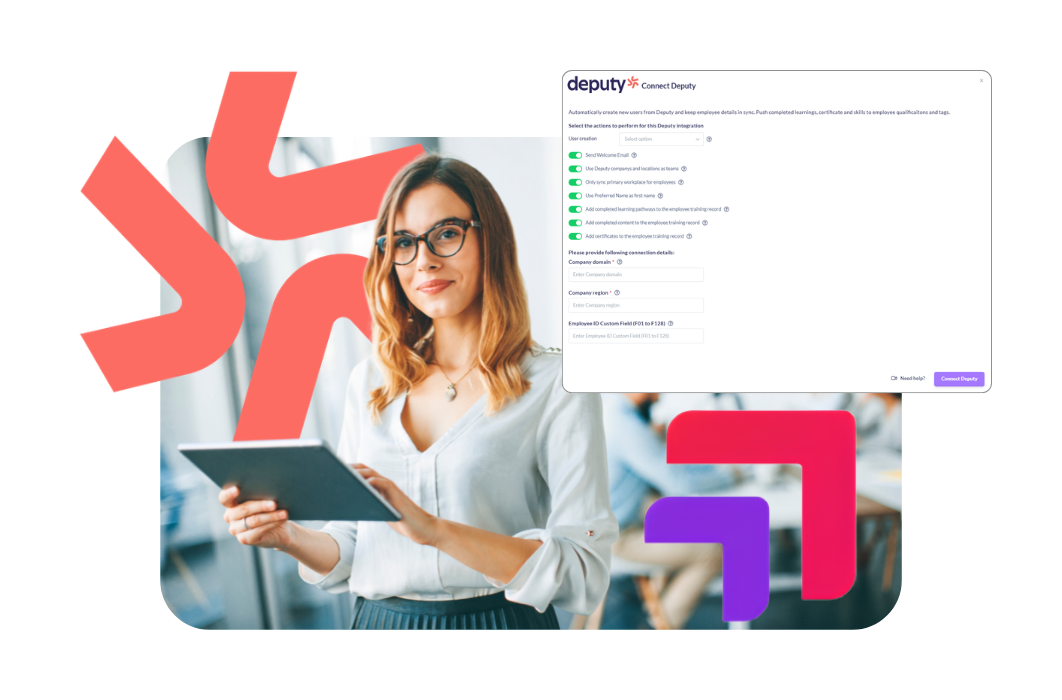
TL;DR: SuperPath is an Australian LMS that integrates with Deputy through a real-time two-way sync. Employees flow from Deputy into SuperPath and are auto-enrolled in required learning. Completed pathways, completed content and certificates are then written back into the employee's Deputy training record, which is the record Deputy uses to decide who can work an area. Deputy customers pay $3 per user per month, everything included, with a 30-day free trial.
Key takeaways
- The SuperPath Deputy integration is a real-time two-way sync. Employee data, learning progress and completions move as events happen, not on a nightly batch.
- Three separate write-back settings control what lands in Deputy: completed learning pathways, completed content, and certificates. Each is a toggle you turn on.
- New hires in Deputy are invited and enrolled automatically in the learning required for their role and location, and prerequisites can be made due before roster allocation.
- Deputy's own training records are applied by hand, and its bulk action adds the training but not the expiry date. Expiries are the part that cannot be maintained in bulk.
- Deputy's training requirement is a prompt, not a lock. A manager can override it, and the shift is flagged. That is precisely why the underlying records have to be automatic.
- Deputy partners get SuperPath at $3 per user per month against the standard AUD $5, with the Australian compliance library, AI Course Builder, workflows, analytics and mobile app included.
Why do training and rostering need to be connected?
In a shift-based business the compliance question is not "has this person been trained?" but "is this person qualified for the shift I am about to publish?" Those are different questions, and only one of them is answerable from a spreadsheet. The moment training records live apart from the roster, somebody is cross-referencing by hand.
A duty manager builds next week's roster, then tries to remember who holds a current food safety certificate and who has done the new machine induction. According to Deputy, more than 320,000 workplaces globally use Deputy to manage schedules, and many are exactly this shape: multiple locations, high casual turnover, and starters who begin in days rather than weeks.
The regulatory stakes are not abstract. Under the model Work Health and Safety Regulations, regulation 39 requires training to be "suitable and adequate having regard to" the nature of the work, the risks associated with it, and the control measures in place. The model Code of Practice How to Manage Work Health and Safety Risks puts the standard plainly: "It is insufficient to simply give a worker the procedure and ask them to acknowledge that they understand and are able to perform it." Victoria runs its own Occupational Health and Safety Act rather than the model laws, but the expectation of evidenced, competency-based training holds across jurisdictions.
When a worker is injured or an auditor asks, the question is whether the person on that shift was trained and current at that moment. Answering it beforehand, by making qualification a condition of the roster, is the point of connecting training to Deputy.
What is the SuperPath Deputy integration and how does it work?
The SuperPath Deputy integration is a real-time two-way connection between Deputy, the workforce management and rostering platform, and SuperPath, an all-inclusive Australian LMS. Deputy stays the source of truth for people and shifts. SuperPath delivers, assesses and certifies the training, then writes the result back into Deputy.
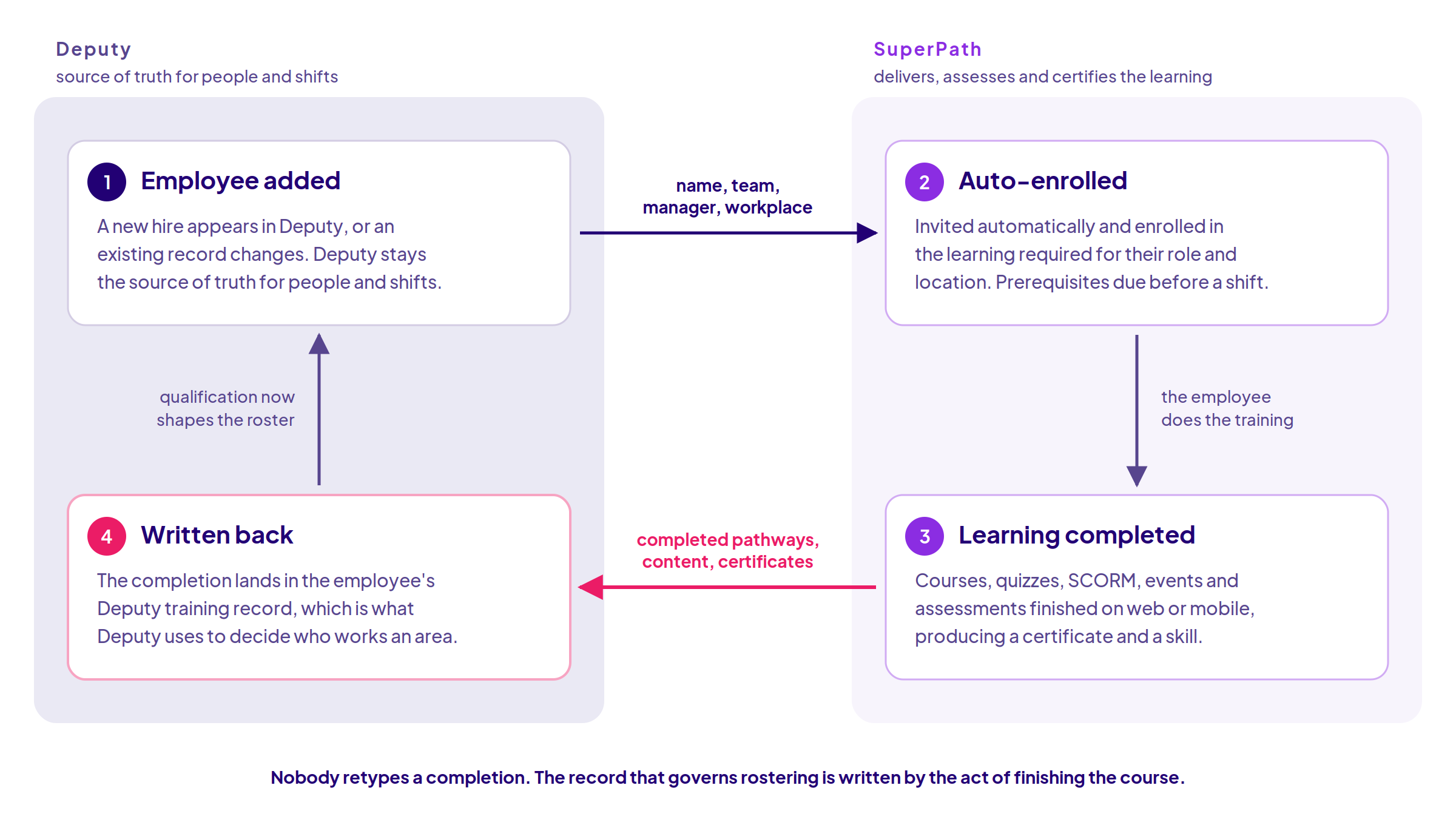
Two parts of that loop deserve more than a box. Pathways sequence onboarding, compliance and role-specific training into one journey and workflows handle the reminders, escalations and renewals, so step two runs without anyone driving it. And step four is the half that actually changes the roster: because Deputy already uses training records to work out who should be working where, a completion in SuperPath immediately changes who is eligible for a shift.
SuperPath does not own people data or run your rosters, in the same way it keeps Bob as the source of truth in the SuperPath HiBob integration. Deputy owns the workforce and the schedule. SuperPath owns the learning, and sends the outcome back.
What data actually syncs between Deputy and SuperPath?
This is the question most integration pages avoid, so here it is at the level of the actual settings, drawn from SuperPath's own Deputy configuration documentation.
To connect it, you need to be an admin in both SuperPath and Deputy, and you supply two things: your Deputy company domain, which is the customer portion of your Deputy URL, and your region. Four regions are supported: au, eu, uk and us.
Coming from Deputy, the sync keeps name, team and manager aligned as records change. Only Sync Primary Workplace decides whether a person who works across several sites is placed in one team or all of them, which matters more than it sounds in a business where casuals float between locations. Use Deputy company's and locations as teams builds your SuperPath team structure from the Deputy structure you already maintain, so a new site inherits the right learning without anyone rebuilding cohorts. Use Preferred Name respects what people are actually called, and an employee ID custom field can be mapped from any of Deputy's F01 to F128 fields, which is how you keep a payroll or HR identifier consistent across systems.
How people get their accounts is configurable rather than fixed: invitation, password, magic link, Google, Microsoft or SAML. For a deskless workforce with no corporate email, magic link is usually the difference between a rollout that reaches the floor and one that stalls at head office.
Going back to Deputy, there are three independent settings, and it is worth knowing they are separate:
- Add completed learning pathways to the employee training record
- Add completed content to the employee training record
- Add certificates to the employee training record
So you can push whole-pathway completions without cluttering Deputy with every individual module, or push certificates only. Most Deputy training integrations describe write-back as a single on-off idea. It is three decisions, and you should make them deliberately.
When something drifts, Sync Teams and Trigger Full Sync reconcile everything from Deputy on demand, rather than leaving you to hunt for the record that did not move.
How do you automate Deputy training records?
You automate Deputy training records by connecting an LMS that writes completions back into them, so the record is created by the act of finishing the course rather than typed in afterwards. Deputy provides the qualification framework. SuperPath keeps it populated and current.
Deputy's native capability is genuinely useful, and the integration builds on it rather than replacing it. According to Deputy's help centre article on managing training requirements, training requirements have two parts: training modules, which are the certification types, and training records, the instances applied to individual people. Deputy notes that they "allow you to control which team members are recommended to work in a particular area based on their training", and that a record must not be expired to be valid.
The gap is data entry, and it is worth being precise about its size. Deputy's documented path to apply one training record is four steps: open the People page and click the person, choose Employment and click Edit, click Add training and pick the module, then Save. Expiry date, comments and file attachments are not part of those four steps. They are set by expanding the individual record afterwards.
Now do the arithmetic. Take a 200-person business with four required modules each. That is 800 training records to create. Make them annual, as most compliance training is, and it is 800 again every year, forever. Deputy's bulk action helps where one module applies to a whole group, but it adds the training, not the date. Every record that carries an expiry, which means every record that actually matters for compliance, needs the individual record opened to set it. Expiry is the part that cannot be done in bulk, and expiry is the part an auditor asks about.
Task | Deputy on its own | Deputy plus SuperPath |
|---|---|---|
Adding a new starter to training | Add the person, then apply training records by hand | Person syncs from Deputy, invited and enrolled automatically |
Recording a completion | Someone opens the profile and adds the record | Written back on completion |
Setting an expiry date | Expand the individual record, per person | Carried with the completion |
Certificates and skills | Training records you maintain | Pushed into the training record from the LMS |
Keeping records current | Manual updates as certificates renew | Renewals run as workflows and write back |
Delivering and assessing the training | Not the tool's job | Courses, quizzes, SCORM, events and assessments |
The practical test is whether anyone in your business is retyping a completion. If they are, your records are as current as that person's memory. If the LMS writes them, they are current by default, and the analytics and reporting view of who is compliant becomes evidence rather than an estimate.
Can you require training before an employee is rostered?
Yes. SuperPath can make required learning a prerequisite before roster allocation, and because completions land in Deputy's training records, Deputy's own training requirements then govern who is recommended for an area. The training gate and the rostering gate become the same gate.
One honest caveat, and it is the most important paragraph on this page. Deputy's training requirement is a strong prompt rather than a hard lock. Its help centre states that a manager can override the training warning and schedule a team member without the appropriate training into an area, and that the shift is then flagged on the schedule. That override exists for good operational reasons, because a business that cannot fill a shift at 6am does not care about your compliance architecture.
But it changes what the integration is for. If a manager can override the warning, the warning has to be worth trusting, and a flag is only meaningful if the qualification data behind it is current. Automatic write-back is what makes the override safe: the manager is then making an informed decision about a real gap, rather than being warned by a record somebody forgot to update three months ago.
For aged care, disability and healthcare teams, where the qualification question is regulated rather than merely operational, we go deeper in our guide to connecting training, rostering and compliance for aged care and NDIS teams.
How does SkinKandy use SuperPath with Deputy?
SkinKandy uses the SuperPath Deputy sync to make qualification-driven rostering automatic across a fast-growing studio network. It is a safety-critical environment. According to SkinKandy, the business runs more than 110 locations across Australia and New Zealand, and "every piercing artist is nurse-trained, certified in infection protection and use medical-grade sterilisation". Compliance is not a box to tick, it is the service being sold.
The network is also moving quickly. SkinKandy listed on the ASX in May 2026 under the ticker SK1, closed FY26 with 109 studios after 22 openings, had grown to 114 by its August 2026 results, and has flagged 18 to 20 further openings across FY27 plus entry into a market beyond Australia and New Zealand. More than 900 of its people are active users in SuperPath.
Scale is not really the problem, though. The problem is granularity. A piercing studio does not have one qualification, it has a different one for each service, and the person qualified for one procedure is not automatically qualified for the next. Multiply that by 114 sites, a casual workforce, and a studio opening every few weeks, and no L&D team can verify it studio by studio, let alone shift by shift. The company has built hundreds of specialised courses in SuperPath's AI Course Builder covering the services and safety procedures its artists perform.
As Carmi Caetano, Learning and Development Capabilities Partner at SkinKandy, puts it: "The SuperPath platform has enabled us to scale our in store learning to the next level. We have created hundreds of specialised courses in their AI course builder and the real-time sync in Deputy means our bookings system and roster are kept up to date in real-time based on skills and capabilities."
Read that last clause again, because it is the whole argument. The outcome is not a tidier training report. It is that a customer is never booked with a piercer who is not qualified for that specific service. Training stopped being a record and became a control.
The same shape holds at the other end of the market, where businesses like Complete Scaffold and Quantum United run the same integration with no L&D function behind it. The two things that normally consume an LMS rollout are already handled. Compliance content comes from the 15 included Australian courses covering work health and safety, privacy, cyber security, bullying and harassment, anti-discrimination, modern slavery, psychological safety, child safety and Respect@Work positive duty, so the content library is bundled rather than negotiated. The business-specific part, the site inductions and plant procedures, is what the AI Course Builder is for. For an owner-operator, that combination is the whole proposition.
How does SuperPath compare with other Deputy training integrations?
Several learning platforms integrate with Deputy, and more than one syncs completions back. "Does it sync?" no longer separates these products. What separates them is what gets written back, how current it is, and what you buy separately to make it work.
Capability | SuperPath | SC Training (formerly EdApp) | Allara Global | Expert LMS | Op Central (Ideagen) |
|---|---|---|---|---|---|
Direction of sync | Real-time two-way: employee data, progress and completions | Two-way: new hires in, completed training records back | Two-way: new hires in, learning history back | Employee sync for onboarding; direction not stated | Deputy rosters shown inside Op Central; write-back not described |
Written back to Deputy | Pathways, content and certificates, as three separate settings | Completed training records | Employee learning history | Not stated | Not stated |
Prerequisite training before rostering | Yes | Yes, courses can be set as prerequisites | Not stated | Not stated | Not stated |
AI course authoring | Included | Available | Not stated | Not stated | Not stated |
Australian compliance library | 15 courses included | Global course library included | Off-the-shelf compliance and safety courses | Not stated | Policy and procedure content |
Published pricing | $3 per user per month for Deputy customers, all inclusive | Free, Premium and Enterprise; no figures published | Not publicly listed | Not publicly listed | Not publicly listed |
Read fairly, that table says two things. SC Training and Allara Global both send learning data back to Deputy and each is a credible choice. The separation is in the detail: SuperPath writes pathways, content and certificates as three independently controllable settings into the records Deputy uses to decide who works an area, and publishes its price.
The other two are different propositions. Expert LMS describes its integration in terms of syncing your workforce and automating onboarding, without stating what returns to Deputy. Op Central, now part of Ideagen, surfaces a team member's next five shifts inside Op Central alongside their policies and checklists: a useful consolidation of the employee's view, not a training record flowing back.
What is the exclusive Deputy offer?
Deputy customers get the full SuperPath platform at $3 per user per month against the standard AUD $5, with a 30-day free trial and no separate charges for content, authoring or integrations. For a business rostering hundreds of casuals, that single number decides whether training reaches everyone or only head office.
Included at that price: unlimited courses and learning pathways, the Australian compliance library, the AI Course Builder, compliance tracking and alerts, the analytics and reporting dashboard, mobile app access for every user, the two-way Deputy integration, custom branding, certificates of completion and dedicated onboarding support. SuperPath is rated 5.0 out of 5 from 13 reviews on Capterra Australia.
If you already run Deputy, the fastest way to judge this is to connect it and look. Start on the SuperPath for Deputy page and sync a single location before you roll it wider.
About the author
Barry Heath is Head of Growth & Partnerships at SuperPath, where he leads integration partnerships with workforce and HR platforms including Deputy. He spent seven years on the founding team at Go1, the Australian-founded learning content company, and has worked with Australian L&D and HR teams on learning technology for over a decade.
Sources
- Deputy. "Deputy launches International Shift Worker Sunday." Deputy Newsroom. https://news.deputy.com/deputy-launches-international-shift-worker-sunday-sj3c1t
- Deputy. "Managing training requirements." Deputy Help Center. https://help.deputy.com/hc/en-au/articles/4657753960463-Managing-training-requirements
- Deputy. "Deputy and Superpath Integration." Deputy Integrations. https://www.deputy.com/integrations/superpath-io
- SuperPath. "How to connect and configure Deputy." SuperPath Help Centre. https://help.superpath.io/en/article/how-to-connect-and-configure-deputy-1ikxj9p/
- Safe Work Australia. "Model Work Health and Safety Regulations, regulation 39: Provision of information, training and instruction." https://www.austlii.edu.au/cgi-bin/viewdoc/au/legis/cth/consol_reg/whasr2011327/s39.html
- Safe Work Australia. "Model Code of Practice: How to Manage Work Health and Safety Risks." https://www.legislation.gov.au/F2016L00414/asmade/2016-03-30/text/original/epub/OEBPS/document_1/document_1.html
- SkinKandy. "About SkinKandy, The Piercing Experts." https://skinkandy.com/pages/our-story
- Kalkine Media. "SkinKandy (ASX:SK1) Shares Rise 2% After Beating Prospectus Forecasts." 25 August 2026. https://kalkine.com.au/stock-analysis/consumer/skinkandy-asxsk1-shares-rise-2-after-beating-prospectus-forecasts
- SC Training (formerly EdApp). "Deputy integration." https://training.safetyculture.com/deputy-integration/
- Allara Global. "Deputy LMS integration." https://allaraglobal.com/integrations/deputy
- Expert LMS. "Deputy LMS Integration." https://expertlms.com/platform/integrations/deputy/
- Deputy. "Deputy and Op Central Integration." https://www.deputy.com/au/integrations/opcentral
- Capterra Australia. "SuperPath Cost and Reviews." https://www.capterra.com.au/software/1018841/superpath
Frequently asked questions
Yes. SuperPath integrates with Deputy through a real-time two-way sync, listed in Deputy's integration marketplace. Employee details sync from Deputy into SuperPath, new hires are invited and enrolled automatically, and completed pathways, completed content and certificates are written back into the Deputy employee training record.