


The LMS That Integrates With foundU: Two-Way Sync, Tag-Based Enrolment and Qualifications That Keep the Roster Compliant
SuperPath is the LMS that integrates with foundU: workers sync in, training assigns by foundU tags, and qualifications with expiry dates write back to the roster in real time, from $1 per active user per week.

TL;DR: SuperPath is the LMS that integrates with foundU through a two-way sync. Staff, teams and managers flow in from foundU, training is assigned by foundU tags, employment type and location, and completed qualifications with expiry dates write straight back to the worker's foundU profile, where rostering can use them. foundU customers pay from $1 per active user per week.
Key takeaways
- SuperPath is one of two Featured LMS partners on foundU's integrations directory, listed under LMS and AI Content, with an exclusive foundU offer from $1 per active user per week.
- The SuperPath foundU integration writes completed qualifications, with expiry dates, back to foundU in real time, and adds skills earned in SuperPath to the worker's foundU tags.
- foundU's roster level compliance only lets a worker be rostered if they hold the qualification the roster requires. When the LMS writes that qualification automatically, training stops being a spreadsheet and becomes a roster rule.
- According to the ABS, Australia had 2.4 million casual employees in August 2025, 19 per cent of all employees. Those are the workforces foundU is built for, and the hardest to keep trained.
- Joint foundU and SuperPath customers include Altus Traffic, Roof Racks Galore, Intrepid Cleaning and Beaumont Care.
Why do foundU customers need an LMS?
foundU customers need an LMS because foundU runs the people, the shifts and the pay, while training is a separate job: assigning the right courses to each worker, proving they passed, and renewing what expires. foundU deliberately leaves that job to specialist LMS partners, and the gap matters most for casual, labour hire and multi-site workforces.
foundU describes itself as "Australia's most adaptable cloud-based workforce management software". Its platform covers onboarding, rostering, time and attendance, award interpretation, payroll and invoicing for industries including labour hire, cleaning, aged care, healthcare, hospitality, logistics and manufacturing. It is particularly strong where a business has a large, fluid workforce spread across sites and clients.
What foundU does not try to be is a learning management system. Its pricing page includes custom training on how to use foundU in its Performance tier, but no LMS. Instead, its integrations directory lists five LMS partners, and that is the right design. A workforce platform owns who works where and when. An LMS owns who has been trained to do the work, to what standard, and until when.
The workforces foundU serves make this harder than average. According to the Australian Bureau of Statistics, there were 2.4 million casual employees in August 2025, 19 per cent of all employees, plus 1.1 million independent contractors. Casual and contingent workers start quickly, work across sites, often have no company email address, and rarely sit at a desk. A training process designed around a permanent office team simply does not reach them.
The legal standard does not relax for casuals. Under the model Work Health and Safety Regulations, regulation 39 requires the information, training and instruction given to workers to be "suitable and adequate" for the work and its risks. The model Code of Practice How to Manage Work Health and Safety Risks is blunter: "It is insufficient to simply give a worker the procedure and ask them to acknowledge that they understand and are able to perform it." A policy signed off during digital onboarding is evidence that someone read a document. It is not evidence that they were trained.
What is the SuperPath foundU integration and how does it work?
The SuperPath foundU integration is a two-way connection between foundU, the workforce management platform, and SuperPath, an all-inclusive Australian LMS. foundU stays the source of truth for people and shifts. SuperPath assigns, delivers and certifies the training, then writes qualifications and skills back to the worker's foundU profile.
The loop runs in four steps:
- A worker is created or changed in foundU. Their name, team and manager sync to SuperPath, and foundU tags, employment type or work locations can become SuperPath teams.
- SuperPath creates their account and enrols them. Pathways assign the induction, compliance and role training their team requires, based on the same foundU data you already roster with.
- They complete and pass the learning, on a phone, tablet or desktop. Workflows send the reminders and escalations so nobody has to chase.
- The result is written back. Completed learning becomes a qualification on the worker's foundU profile, with its expiry date, and any skills earned become foundU tags.
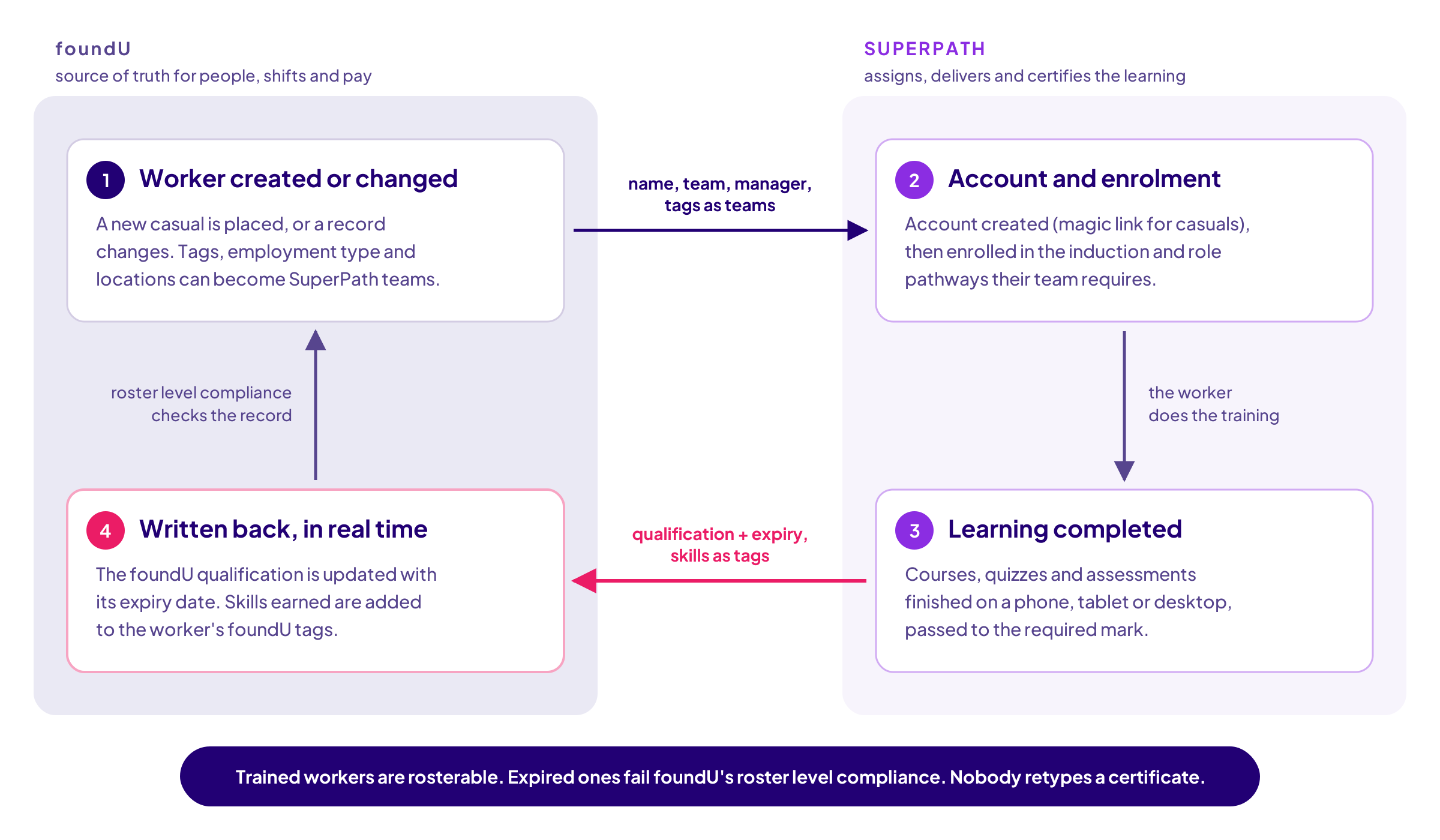
The boundary is deliberate, in the same way SuperPath keeps Deputy as the source of truth in the SuperPath Deputy integration and Employment Hero in the SuperPath Employment Hero integration. SuperPath does not roster, pay or own employee records. foundU owns the worker. SuperPath owns the learning, and sends the outcome home to the place your rosterers already look.
What data actually syncs between foundU and SuperPath?
From foundU into SuperPath: name, team and manager, with teams built from foundU tag groups, employment type or position locations, and leavers disabled automatically. From SuperPath back into foundU: completed qualifications with expiry dates, written in real time, and skills earned through learning, added as foundU tags.
Most integration pages stop at "seamless sync". Here it is at the level of the actual settings, drawn from SuperPath's foundU configuration guide and foundU's own help centre article on the SuperPath integration.
Coming from foundU, each worker's name, team and manager sync into SuperPath, and the record updates whenever it changes in foundU, on a sync that runs every 30 minutes. Workers who are terminated or disabled in foundU are disabled in SuperPath, so a leaver's access closes without anyone remembering to do it.
How teams are built is chosen when you connect, and you can combine the options:
- Use foundU tags as teams: every tag in a tag group you nominate becomes a SuperPath team. If you already tag workers by client, site, skill set or contract, your training audiences exist on day one.
- Use employment type as team: casual, part-time and full-time workers become their own teams, so a casual induction pathway can assign itself.
- Use foundU positions and locations as teams: a worker's location becomes their team, which suits site-specific inductions.
How workers get their accounts is also a setting, and for a contingent workforce it is the difference between a rollout that reaches the frontline and one that stalls:
- Create with Magic Link: the account is created and the worker signs in from a link, with no password to forget. Usually the right choice for casual staff.
- Invite Users: an invitation goes out and the person appears once they accept. The right choice for Google or Microsoft single sign-on.
- Create with Password, Google, Microsoft or SAML: for organisations with an established identity setup.
- Manual: no accounts are created automatically, but people you add yourself are kept in sync.
Going back to foundU, two things are written, both in real time:
What SuperPath writes back | Triggered by | Where it lands in foundU |
|---|---|---|
Qualification, with expiry date | A completed learning pathway or learning assignment mapped to a foundU qualification | The qualification on the worker's foundU profile |
Skill | A skill earned by completing learning in SuperPath | A tag on the worker's foundU profile |
Three details are worth knowing before you connect:
- Qualifications are mapped, not guessed. Each foundU qualification you want SuperPath to update is matched by its foundU API or External ID, so the induction that should produce "Site Induction: Client A" always produces exactly that record.
- Skills become tags, and tags are what rosterers filter on. foundU lets you tag worker profiles by role and qualification to find suitable staff for a shift, so a skill proven in SuperPath turns up where the next shift is being filled.
- You can catch up on demand. A 24-hour sync picks up recent changes and a full sync brings in every worker, both from the integration settings.
How does training gate the roster in foundU?
Training gates the roster through foundU's roster level compliance, which only lets a worker be rostered if they hold the qualification the roster requires. SuperPath writes completed training into foundU as that qualification, with its expiry date, in real time. So passing a course makes a worker rosterable, and a lapse makes them unrosterable.
This is the part of the integration I find most valuable, and it is easy to miss. foundU calls the control roster level compliance: if an employee is to be rostered, they must hold a specified qualification, such as a course completed in SuperPath. foundU's guidance on rostering and compliance adds automatic alerts for document expiry and restrictions that "stop them from being added to shifts if their information has expired". That is a powerful control. But it is only as good as the qualifications underneath it, and somebody has to keep those current.
Do the arithmetic for a labour hire business with 400 workers on its books, each needing three expiring items: a site induction, a WHS refresher and a role ticket such as manual handling. That is 1,200 qualification records, each with a date that must be right. Every new starter adds three more. Every renewal changes one. If those dates are typed in by hand from course certificates, the roster control is only as reliable as the busiest person in the office on a Friday afternoon.
Now run the same scenario with the loop closed:
- A new casual is placed at 4pm and enrolled automatically into the client's induction pathway, because their foundU tag puts them in that client's team.
- They finish it on their phone that evening. The qualification, with its expiry date, appears on their foundU profile in real time.
- Tomorrow's roster can use them, because the qualification roster level compliance checks is already there. Nobody retyped a certificate.
- Eleven months later, a renewal is assigned before the qualification lapses. If they complete it, the date rolls forward. If they do not, roster level compliance does exactly what it was designed to do.
Expiry is the field auditors ask about and the field most likely to be wrong when it is maintained by hand. When the LMS writes it, the roster rule becomes trustworthy, and the compliance conversation shifts from "can we prove it?" to "it is already proven".
Why is training harder for labour hire and contingent workforces?
Training is harder for labour hire and contingent workforces because the worker moves between sites and clients, starts at short notice, and two businesses share the safety duty. The provider and the host both have to be confident the worker is trained for the specific work, and both need evidence they can produce on request.
Safe Work Australia's guidance on labour hire is clear that "both the labour hire agency and the host organisation are persons conducting a business or undertaking", and that they "cannot contract out of or transfer their WHS duties". Workers must receive "a safety induction that sets out WHS policies, procedures and practices", plus "any additional training required for the particular work". The provider and host must work together "in a cooperative and coordinated way". In practice, that means the evidence of training has to be shareable and specific to each placement, not a generic induction completed once in 2023.
Licensing is tightening the scrutiny further. In Queensland, "all labour hire providers operating in Queensland need to be licensed under the scheme", licensees must comply with "relevant laws", and "users of labour hire must only engage licensed providers", according to the Queensland Labour Hire Licensing regulator. According to Baker McKenzie, Victoria's expanded fit and proper person test took effect on 1 June 2026, and newly affected providers in South Australia had to be licensed by 29 July 2026, with significant penalties for providers and hosts in unlicensed arrangements. None of these schemes prescribes an LMS, but every one of them rewards a provider that can show its compliance rather than assert it.
Three integration features exist for exactly this workforce:
- Teams from foundU tags mean a worker tagged for a client receives that client's site induction automatically, and a worker tagged for two clients receives both.
- Magic link accounts reach casuals who have no work email or corporate login, which is most of them.
- Qualifications written back to foundU give the provider one place to show a host exactly who is inducted for their site, and until when.
SuperPath's contingent workforce solution covers the wider picture, including mobile learning, licence and ticket tracking, and multi-site reporting.
Which LMS integrations does foundU offer, and how do they compare?
foundU's integrations directory lists five LMS partners: SuperPath and Tribal Habits as Featured partners, plus Allara Global, AMSED and Go1. Each suits a different buyer. The practical differences are what syncs back into foundU, how training is assigned from foundU data, what content is included, and what the foundU offer costs.
In the interests of transparency: I work for SuperPath, and every other company in this table is also a foundU partner and a good business. So the comparison below uses only what each vendor and foundU publish, and where something is not published, it says so.
| SuperPath | Tribal Habits | Allara Global | Go1 | AMSED |
|---|---|---|---|---|---|
foundU listing | Featured, LMS and AI Content | Featured, LMS and Training Content | LMS, hospitality focus | LMS and Training Content | CPD and LMS for Aboriginal medical services |
People sync from foundU | Name, team and manager every 30 minutes; teams from tags, employment type or location; leavers disabled | Job title, location and manager every two hours; managed by Tribal Habits | New employees added automatically; frequency not published | Workers sync as they become active; archived staff archived | Not published |
Written back to foundU | Qualifications with expiry dates, in real time; skills as foundU tags | Completion certificate as a qualification | Completed training records; scope not published | Course status and completion date in the foundU Training tab | Learning records stored against the employee profile |
Content approach | Included library of Australian compliance, workplace skills, AI readiness, sales, hospitality and retail courses, all editable | 500+ editable AU and NZ modules on Business plans | Pre-built hospitality library | Thousands of premium courses on the Premium tier | Accredited CPD for the Aboriginal health workforce |
Authoring | AI Course Builder included | Built-in authoring | Course and quiz creation | Course creation in the Go1 dashboard | Not published |
foundU offer pricing | From $1 per active user per week | Not on the listing; Business plans published at $6.00 to $8.50 per monthly active user | From $8 per active user per month | Free tier for your own content; Premium priced per active user after you register interest | Not published |
Sources: foundU's integrations directory and partner listings, foundU help centre articles on the Tribal Habits and Go1 integrations, Allara Global's foundU page, Tribal Habits pricing and the SuperPath help centre, all checked 3 November 2026.
Read fairly, each has a genuine home. AMSED is purpose-built for Aboriginal medical services and their CPD obligations; if that is your organisation, it deserves a serious look. Allara Global brings a hospitality-specific library. Go1 has the broadest catalogue, and its free tier suits a team that only wants to host its own content. Tribal Habits is a credible Australian LMS with a strong library, and its managed integration also writes completion certificates back to foundU as qualifications.
SuperPath separates in four places. Training is assigned directly from foundU tags, employment type and locations, so your roster structure is your training structure. Qualifications arrive in foundU with their expiry dates, in real time. Skills come back as foundU tags, which no other listing describes. And the price is one number with content, AI authoring, the integration and local support included.
How much does an LMS for foundU cost?
SuperPath's exclusive foundU offer starts from $1 per active user per week, billed in the same active-user unit foundU itself uses. At that rate, even if every worker were active every week of the year, that is $52 per user annually, below SuperPath's standard all-inclusive price of $5 per user per month, with content, AI authoring and the integration included.
For context, foundU's own published plans start at $3.25 per active user per week for Essential and $3.75 for Everyday. On the foundU offer, the entire learning layer costs less than a third of the workforce platform it plugs into.
Here is what the learning line costs at published list prices for the three LMS partners that publish a figure, assuming every user is active in every billing period:
Active users | SuperPath, foundU offer | Tribal Habits, Business plan | Allara Global, foundU offer |
|---|---|---|---|
100 | from $5,200 a year | $9,564 a year | from $9,600 a year |
200 | from $10,400 a year | $18,144 a year | from $19,200 a year |
500 | from $26,000 a year | $36,000 a year | from $48,000 a year |
A few caveats keep this honest. Tribal Habits publishes its prices ex GST and lists managed HRIS integrations as a paid add-on on Business plans. Both foundU offers, SuperPath's and Allara Global's, are "from" prices. Go1 and AMSED do not publish foundU pricing. Active-user definitions differ between vendors, and any of them may negotiate. The point stands regardless: on published numbers and published documentation, the integration that does the most inside foundU is also the least expensive.
For a wider view of Australian pricing models, see our guide to how much an LMS costs in Australia.
Why do foundU's teams recommend SuperPath?
foundU's sales and customer success teams bring SuperPath into the LMS conversations their customers start, and recommend it as their preferred LMS. That position was earned over years of joint work: a shared Slack channel, joint deals and implementations, and an integration built and extended around foundU's data and the workforces foundU serves.
"Great partnerships create better outcomes for customers, and that's exactly what we see in our relationship with SuperPath. By working together as a connected ecosystem, we're able to help businesses create an environment that encourages ongoing employee engagement, learning and development, while making it easier to manage training and compliance requirements. It's a partnership that delivers real value to our customers."
Rowena McIver, Product Solution Specialist, foundU
I have worked on technology partnerships for most of my career, including helping to establish the Go1 and Employment Hero partnership in its early days. I cannot remember a partner we have worked more closely with than foundU. Our teams share a Slack channel. When a foundU customer asks about learning, their account manager brings us in, and we work the opportunity together. When a joint customer needs help, both teams are in the same thread, which means nobody is told to "raise it with the other vendor".
That closeness came from three things, built up over a long time.
Trust that was earned in front of customers. foundU's teams put their own reputation on the line every time they recommend a partner. We have tried to repay that by doing what we said we would, implementing quickly, and treating their customers as if they were the only customer we had.
An integration built for foundU, not adapted to it. Most integrations sync names and stop. Ours was designed around how foundU customers actually structure their workforce: by tag, by employment type, by location. Then we kept building. Qualifications with expiry dates now write back in real time, skills now flow into foundU tags, and new options arrive as foundU customers ask for them.
Content and AI shaped around foundU's industries. foundU serves labour hire, cleaning, aged care, healthcare, hospitality, retail and logistics. SuperPath's included library covers Australian compliance, essential workplace skills, AI readiness, sales, hospitality and retail, with new courses added each month at no additional cost. Specialist aged care and healthcare content from HealthStaffEd and Wyzed is available inside the platform. Every course can be edited in the AI Course Builder, so a site induction for one client and a different one for the next takes minutes, not a design agency. We have run a co-branded campaign with foundU on exactly that, aimed at shift-heavy workforces.
For a foundU customer, the practical result is one recommendation, one conversation and one support relationship that spans both platforms, with local teams on both sides who already know each other by first name.
Who already runs foundU and SuperPath together?
Joint foundU and SuperPath customers span traffic management, retail, cleaning and aged care. They include Altus Traffic, Roof Racks Galore, Intrepid Cleaning and Beaumont Care, each running workforce management in foundU and training in SuperPath, with the integration connecting the two.
Altus Traffic describes itself as a traffic management provider with more than 5,500 staff working across more than 50 regions. Altus launched its DRIVE programme on SuperPath and reached a 78 per cent participation rate across more than 5,000 staff, with enrolment driven by foundU tags so the right people landed in the right pathways without manual lists. At that scale, tag-based enrolment is the difference between a programme that launches and one that is still being spreadsheeted.
Roof Racks Galore fits and sells vehicle racks and touring accessories from 36 locations across every Australian state and territory, according to its website. A national retail and fitting network needs consistent training at every store, and a rollout that does not depend on each store manager remembering who started this week.
Intrepid Cleaning is a Perth cleaning business specialising in schools and boarding houses. School cleaning crews work around students and outside office hours, so training has to reach them on their own devices, not at a desk.
Beaumont Care is an aged care provider with homes across South East Queensland, from Wamuran to Mount Tamborine. Aged care training is continuous and heavily evidenced, which is exactly where qualifications that write themselves into the roster earn their keep.
Several of these customers, including Altus Traffic, Roof Racks Galore and Intrepid Cleaning, previously used Go1. Go1 remains an excellent content business. What these teams wanted was an LMS with Australian content included and training records that land in foundU, rather than a separate content subscription to manage. For more on that decision, see our guide to Go1 alternatives.
How do you set up the SuperPath foundU integration?
Setting up the integration starts in SuperPath: open Settings, then Integrations, connect foundU, choose your sync options and enter your foundU company domain. According to foundU's help centre, initial setup including branding and content upload takes "no longer than 1 hour". You need to be an admin in both platforms.
The steps, from foundU's SuperPath integration article and the SuperPath help centre:
- Log in to both foundU and SuperPath as an admin.
- In SuperPath, go to Settings, then Integrations, hover over the foundU tile and select View details, then Connect foundU.
- Toggle the sync options you need: auto-invite, teams from tags, employment type or locations, qualifications and skills.
- Enter your company domain, which is your foundU subdomain without ".foundu.com.au". If you use tags as teams, add the tag group ID from foundU; separate several with commas.
- Choose how accounts are created, for example magic link for casual staff, then confirm you have permission to integrate and select Continue Integration. A green tick confirms the connection.
- Map your qualifications by entering each foundU qualification's API or External ID against the matching learning, then run a full sync.
Two prerequisites are worth checking first. The qualifications you want SuperPath to update must already exist in foundU. And the integration is available for SuperPath accounts hosted in Australia or the United States, not Europe.
Start small. Connect, sync one tag group, map a single induction qualification, and watch it appear on a worker's foundU profile before you roll wider. If you want help, SuperPath's local team does this with you, and foundU's team knows the process well.
When do you not need a separate LMS?
You may not need a separate LMS if your workforce is small and stable, your training is a handful of generic courses, and nobody asks you to evidence expiry dates. In that case documents and sign-offs in foundU's digital onboarding may be enough, and adding another platform is not worth the effort.
The signals that you have outgrown that are specific. Your workers need client- or site-specific inductions. You manage tickets, licences or certificates that expire. A host, auditor, insurer or licensing regulator asks who was trained, on what, and when. You run multiple sites with different requirements. Or you are spending Friday afternoons typing completion dates into worker profiles. If two or more of those apply, an LMS that writes back to foundU will pay for itself in admin time alone.
If your program depends on renewals, our guide to how often compliance training is required in Australia sets out where the law sets a frequency and where your own policy does.
How do you get started?
If you already run foundU, the quickest way to judge the integration is to connect it and watch a qualification, with its expiry date, write itself onto a real worker's profile. Start on the SuperPath foundU integration page, ask your foundU account manager about the exclusive offer, or request SuperPath's 30-day free trial.
You keep foundU as the home of your people, shifts and pay. You gain a full LMS, an Australian course library you can edit, AI authoring and qualifications that keep your roster compliant, from $1 per active user per week. SuperPath is rated 5.0 out of 5 from 13 reviews on Capterra Australia.
About the author
Barry Heath is Head of Growth & Partnerships at SuperPath, an Australian all-inclusive LMS for mid-to-large organisations, and leads SuperPath's partnership with foundU. He spent seven years on the founding team at Go1, where he helped establish the Go1 and Employment Hero partnership. He now works with workforce and HR platforms including foundU, Deputy, HiBob and Employment Hero on connecting people data with learning.
Sources
- foundU. "Explore foundU's Network of Partners and Integrations." foundU, 2026. https://www.foundu.com.au/integrations
- foundU. "SuperPath integration." foundU, 2026. https://www.foundu.com.au/integrations/superpath
- foundU. "Allara Global integration." foundU, 2026. https://www.foundu.com.au/integrations/allara-global
- foundU. "Pricing." foundU, 2026. https://www.foundu.com.au/pricing
- foundU. "The Role of Rostering in Compliance Management." foundU, 2026. https://www.foundu.com.au/blogs/the-role-of-rostering-in-compliance-management
- foundU Help Centre. "SuperPath LMS integration." 2026. https://help.foundu.com.au/hc/en-us/articles/9103933959055-SuperPath-LMS-integration
- foundU Help Centre. "Tribal Habits LMS integration." 2026. https://help.foundu.com.au/hc/en-us/articles/7143090831759-Tribal-Habits-LMS-integration
- foundU Help Centre. "How to use your go1 foundU integration." 2026. https://help.foundu.com.au/hc/en-us/articles/360001381936-How-to-use-your-GO1-foundU-Integration
- foundU Help Centre. "Register your interest and connect to the go1 LMS integration." 2026. https://help.foundu.com.au/hc/en-us/articles/360001378196-go1-LMS-integration
- SuperPath Help Centre. "How to connect and configure foundU." September 2026. https://help.superpath.io/en/article/foundu-11wgytt/
- Allara Global. "foundU integration." Allara Global, 2026. https://allaraglobal.com/integrations/foundu
- Tribal Habits. "Pricing." Tribal Habits, 2026. https://tribalhabits.com/pricing
- Australian Bureau of Statistics. "Working arrangements, August 2025." ABS, 2025. https://www.abs.gov.au/statistics/labour/earnings-and-working-conditions/working-arrangements/aug-2025
- Safe Work Australia. "Labour hire: WHS duties." Safe Work Australia. https://safeworkaustralia.gov.au/safety-topic/managing-health-and-safety/labour-hire/whs-duties
- Safe Work Australia. "Model Work Health and Safety Regulations," regulation 39. https://www.safeworkaustralia.gov.au/doc/model-work-health-and-safety-regulations
- Safe Work Australia. "Model Code of Practice: How to Manage Work Health and Safety Risks." https://www.safeworkaustralia.gov.au/doc/model-code-practice-how-manage-work-health-and-safety-risks
- Queensland Government. "About the licensing scheme." Labour Hire Licensing Queensland. https://www.labourhire.qld.gov.au/about-licensing-scheme
- Baker McKenzie. "Australia: Labour hire reform lands in VIC and SA." Baker McKenzie, July 2026. https://www.bakermckenzie.com/en/insight/publications/2026/07/australia-labour-hire-reform-lands-in-vic-sa
- Altus Traffic. "Altus Traffic." 2026. https://www.altustraffic.com.au/
- Roof Racks Galore. "Store locations." 2026. https://www.roofracksgalore.com.au/locations
- Intrepid Cleaning. "Intrepid Cleaning." 2026. https://www.intrepidcleaning.com.au/
- Aged Care Guide. "Beaumont Care opens state-of-the-art facility in Wamuran." March 2020. https://www.agedcareguide.com.au/talking-aged-care/beaumont-care-opens-state-of-the-art-facility-in-wamuran
- Aged Care Guide. "Beaumont Care Mount Tamborine." 2026. https://agedcareguide.com.au/beaumont-care-mount-tamborine
- SuperPath. "Pricing." SuperPath, 2026. https://www.superpath.io/pricing
- Capterra Australia. "SuperPath reviews." 2026. https://www.capterra.com.au/software/1018841/superpath
Frequently asked questions
Yes. SuperPath is a Featured LMS partner on foundU's integrations directory. The two-way integration syncs each worker's name, team and manager from foundU into SuperPath, builds teams from foundU tags, employment type or locations, and writes completed qualifications with expiry dates and earned skills back to the worker's foundU profile in real time.